Charger Not Charging or Overheating
Part of Batteries, charging and disposal
Most charging problems come down to a few simple causes, and nearly all of them can be found by looking at the charger, the cable, and the battery before anything else.
Why it happens
Worn or damaged cables. The most common cause is a charging cable with frayed insulation, a bent connector, or loose wiring inside. Damage can be invisible from the outside, so a cable that looks fine may still fail.
Wrong charger output. Chargers deliver a set amount of power, measured in volts (electrical pressure) and amps (the amount of current flowing). A charger that does not match the battery's required input can charge too slowly, charge too fast, or overheat the battery. A charger with the wrong voltage, or a damaged cable, can overheat the battery. A higher-amp USB charger is not itself a problem, because the device draws only the current its charging circuit allows.
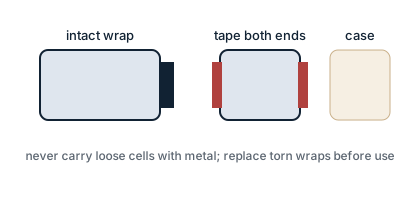
Damaged battery wrap or contacts. The plastic wrap around a removable battery is a layer of insulation. A tear or nick can expose metal and cause a short circuit, which is a direct, unintended path for electricity that creates heat. Dirty or bent metal contact points inside the device also block the flow of power.
Heat and environment. Charging in a hot car, on a soft surface like a bed, or inside a closed case traps heat. Heat is the single biggest warning sign of a charging problem.
Loose seating. A removable battery that is not fully seated, or inserted the wrong way, will not make the connection the charger needs.
Step-by-step fix
Work through these steps in order, and check only one thing at a time so you know what actually changed.
- Unplug everything first. Disconnect the charger from the wall and remove the battery from the device before you inspect anything.
- Inspect the cable and wall adapter. Look for cuts, kinks, exposed wire, or a connector that wiggles. Replace any part with visible damage.
- Check the power source. Try a different wall outlet or USB port that you know works. A dead outlet can look exactly like a dead charger.
- Clean the contacts. Wipe the metal contact points on the charger, cable, and device with a dry cloth or cotton swab. Do not use water. Dirt and pocket lint are common causes of a weak connection.
- Confirm the battery is seated correctly. Reinsert the battery, matching the positive and negative markings on the battery to the markings inside the device. A backwards battery will not charge.
- Match the charger output to the battery. Check the output rating printed on the charger, usually shown in volts (V) and amps (A). It must match the rating recommended by the device or battery. The amp figure is a maximum the charger can supply, so a higher-amp phone charger is safe only if the voltage matches and the cable and port are undamaged.
- Check the battery itself. Look for a torn wrap, dents, or discolouration. If the wrap is damaged or the battery shows any sign of damage, set it aside and do not charge it.
- Test with one known-good part. Swap in a single component that you know works, such as a different cable, then a different wall adapter, then a different battery. If the problem follows one part, that part is the cause.
- Watch the indicator and the temperature. Most chargers show a light for charging and a light for full. If the battery or charger becomes hot to the touch, unplug immediately and stop using that combination.
If a battery, cable, or charger gets hot, swells, or makes any sound while charging, stop and do not use it again.
Prevention
Prevention is mostly about matching parts, charging in the right place, and replacing anything that looks worn.
Use matched equipment. Charge with the charger that came with the device, or one with the same voltage rating and a current rating at least as high as the original. Do not use a charger with the wrong voltage or a damaged cable.
Charge on a hard, non-flammable surface. A table, counter, or desk is safe. Avoid beds, couches, carpet, and enclosed cases that hold heat.
Stay nearby while charging. Do not charge overnight or leave a charging device unattended. If something goes wrong, you want to be able to act.
Keep batteries in cases. Store spare batteries in a plastic case, never loose in a pocket or bag with coins, keys, or other metal objects. Loose metal can short a battery.
Replace worn parts early. A frayed cable or a torn battery wrap is a reason to replace the part now, not later. Replacing these parts early prevents the much larger damage a failed battery can cause.
Unplug when finished. Remove the device from the charger once it is full, and store the charger in a cool, dry place.
This guide is general technical information and is not medical or legal advice.