How to Maintain Long-Term Vape Battery Health
Part of Batteries, charging and disposal
Lithium-ion batteries are the cells that power most vape devices. A lithium-ion cell stores and releases energy through a chemical reaction, and that reaction slowly wears out no matter how carefully the device is used. Long-term battery health is about slowing that wear so the battery keeps a safe charge level and a useful runtime for as long as possible. This guide explains why batteries fade, how to check a battery that seems weak, and how to prevent early failure.
Why it happens
Every lithium-ion cell has a limited number of charge cycles. A charge cycle is one full drain and recharge of the battery. A partial drain of half the battery and a full recharge counts as half a cycle. After a few hundred cycles, the chemistry inside the cell loses its ability to hold a full charge, so the battery runs down faster between charges and the device reports a lower charge sooner.
Heat is the biggest cause of early wear. Charging generates heat, and leaving a device in a hot car or in direct sunlight pushes the cell above its safe temperature range. High heat speeds up the chemical breakdown inside the cell and shortens its life.
Deep discharge is another cause. A deep discharge happens when a battery is run until it is completely empty and left that way. Sitting at zero charge for days damages the internal structure of the cell.
Overcharging also hurts. A vape left plugged in long after it reaches full charge keeps the cell at a high voltage, and holding a cell at high voltage for long periods wears it down.
Physical damage and moisture cause failures too. Dropping a device can dent a cell or break an internal connection. Condensation from cold weather can collect inside a device and corrode contacts or short a circuit. A short circuit is an unintended path for electricity that lets current flow too fast and heat the battery.
Step-by-step fix
If a battery is not lasting as long as it used to, work through these checks in order.
- Confirm the charger is working. Try a different wall adapter and cable if the device charges through USB, or a different bay if it uses an external charger. A weak charger can make a healthy battery look dead.
- Clean the contacts. The contacts are the metal points where the battery meets the device or the charger. Dirt and residue raise resistance, which is opposition to current flow, and that makes charging slower and heat higher. Wipe the contacts with a dry cloth or a cotton swab.
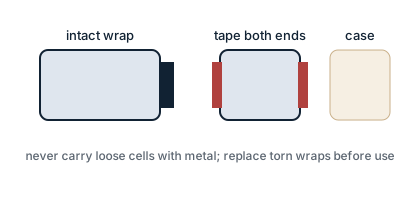
- Check the battery for visible damage. Look for swelling, dents, tears in the outer wrap, or any leaking fluid. A swollen or damaged lithium-ion cell is a fire risk and should be removed from service immediately. Do not charge it, do not pierce it, and do not keep it inside a home.
- Test the charge level. Charge the battery fully, then use the device normally and note how long it lasts compared with when it was new. A battery that holds roughly 80 percent of its original runtime is still serviceable. A battery that drops to half of its original runtime is near the end of its useful life.
- Recycle the worn cell. Do not put lithium-ion batteries in household garbage or regular recycling bins in Alberta. Take them to a battery recycling drop-off point, where they are handled as hazardous material.
- Replace the battery if the device uses removable cells. Buy a cell with the correct specification from a vape shop rather than a generic online listing. Match the amp rating and chemistry printed on the old cell. The amp rating is the maximum safe current the cell can deliver.
Prevention
Store batteries at a partial charge. The ideal storage level is around 40 to 60 percent, not full and not empty. If a device will sit unused for weeks, charge it to roughly half before putting it away.
Keep batteries out of extreme temperatures. Alberta winters and summers both cause problems. Cold raises internal resistance and makes the battery work harder, while heat accelerates chemical breakdown. Do not leave a vape in a parked vehicle in summer or in an unheated space in winter.
Use the charger that came with the device or a quality replacement with the correct output. Unplug the device when it reaches a full charge instead of leaving it on the charger overnight.
Store spare cells in a plastic case, never loose in a pocket or bag where coins or keys can bridge the contacts and cause a short circuit.
Let the device cool before charging. If it has been used heavily or left in the sun, wait until it returns to room temperature before plugging it in.
Finally, keep the device dry. Moisture is a common path to corrosion and internal shorts, and corrosion is the gradual eating away of metal by a chemical reaction.
This guide is general technical information and is not medical or legal advice.